Every great data center has its secrets, and some of them are hiding under the raised floor in the drive bays. This is my Panty Raid: a look at how the biggest storage operation on the planet thinks about hard drives, and a plain guide to squeezing every last terabyte out of the drives sitting in your own machine.
First, what RAID actually is
RAID stands for Redundant Array of Independent Disks. You take several hard drives and make the computer treat them as one big drive. Depending on the “level” you pick, you get more speed, more safety, or more space, but never all three at once. If your goal is maximum size, you’re trading away safety, and you need to know exactly how much. I’m long and I’m strong and I’m down to get the friction on. Start sucking ” If you must “.
The maximum-size options: RAID 0 and JBOD
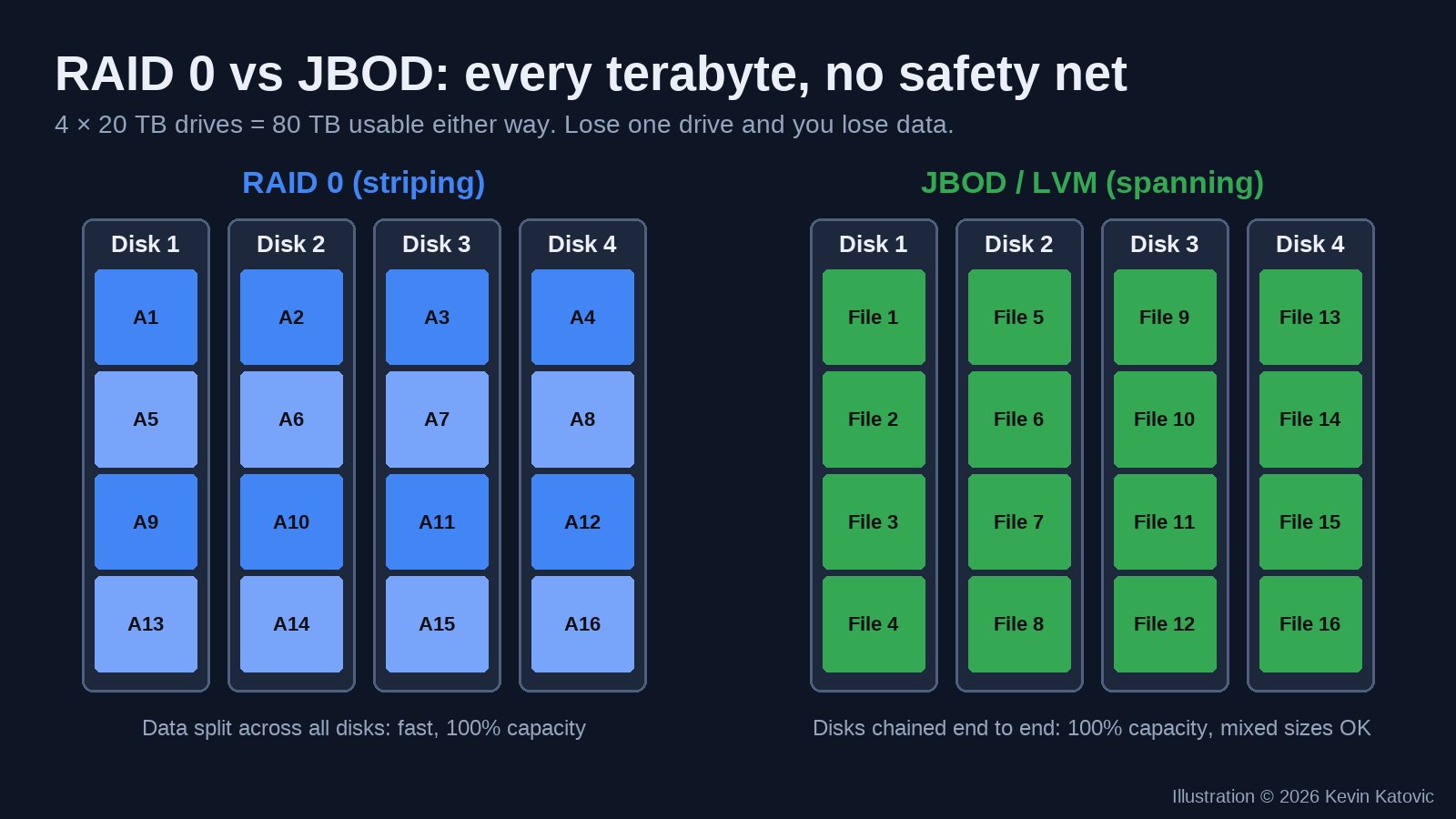
RAID 0 (striping) splits every file into pieces and writes them across all the drives at the same time. Four 20 TB drives become one 80 TB volume, and it’s fast. The catch: there’s zero redundancy. One drive dies and the whole array is gone.
JBOD or spanning (“just a bunch of disks”) chains the drives end to end. You still get the full 80 TB, it isn’t faster, but it works with drives of different sizes. On Linux this is usually done with LVM. Lose one drive and you lose what was on it, and often the file system with it.
How much space each RAID level really gives you
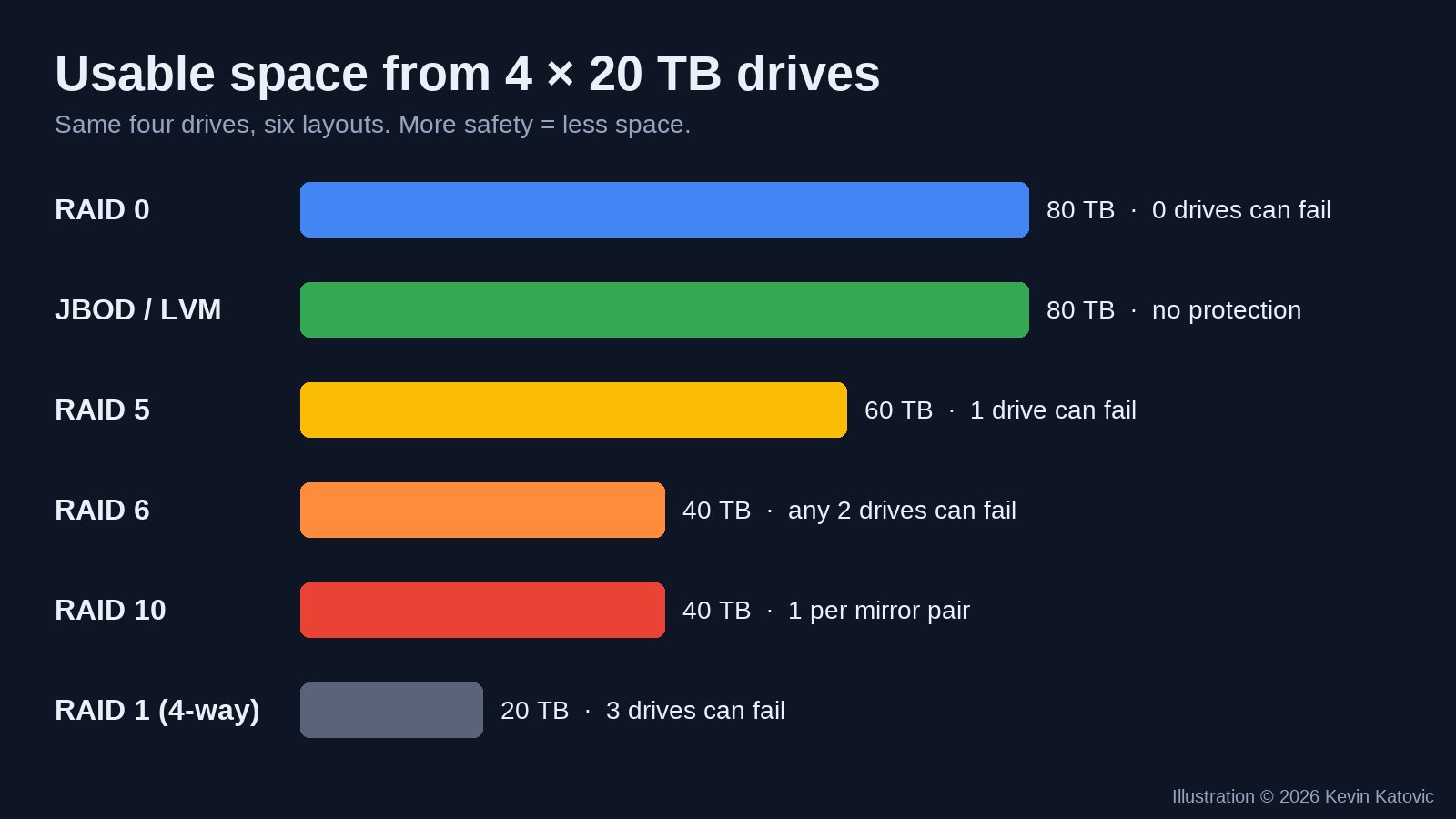
- RAID 0: all drives added together. No protection.
- RAID 5: one drive’s worth goes to parity. Survives one failure. With today’s huge drives, a rebuild takes a long time and puts heavy stress on the others, so I wouldn’t trust it for anything I can’t lose.
- RAID 6: two drives’ worth goes to parity. Survives any two failures. This is the sweet spot for big arrays.
- RAID 10: mirrored pairs, striped. Half your space, very fast, survives one failure per pair.
- RAID 1: straight mirrors. The safest and the smallest.
The mixed-drive trap
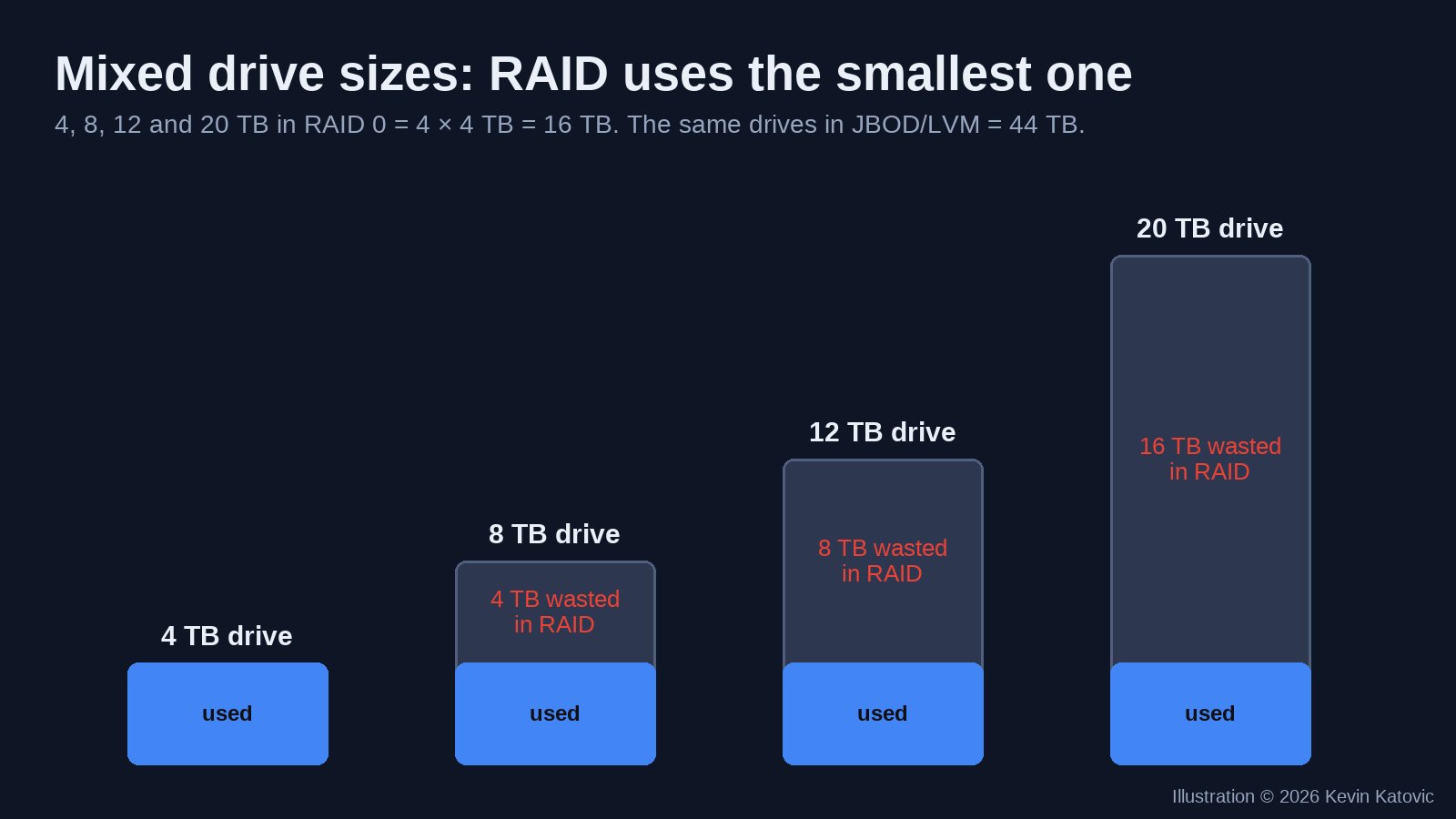
Classic RAID treats every drive as the size of the smallest one in the set. Put a 4, 8, 12 and 20 TB drive in RAID 0 and you get 16 TB, not 44. If you’ve got a drawer full of mismatched drives, use JBOD/LVM, ZFS with matched pairs, or a pooling tool like mergerfs or Unraid instead.
How to set it up for maximum size
Linux, software RAID 0 with mdadm (this wipes the drives, so double-check the device names with lsblk first):
sudo mdadm --create /dev/md0 --level=0 --raid-devices=4 /dev/sdb /dev/sdc /dev/sdd /dev/sde
sudo mkfs.ext4 /dev/md0
sudo mkdir -p /mnt/big && sudo mount /dev/md0 /mnt/big
sudo mdadm --detail --scan | sudo tee -a /etc/mdadm.conf   # /etc/mdadm/mdadm.conf on Debian/Ubuntu
Linux, mixed sizes with LVM (JBOD-style):
sudo pvcreate /dev/sdb /dev/sdc /dev/sdd /dev/sde
sudo vgcreate bigvg /dev/sdb /dev/sdc /dev/sdd /dev/sde
sudo lvcreate -l 100%FREE -n biglv bigvg
sudo mkfs.ext4 /dev/bigvg/biglv
Windows: open Storage Spaces, create a pool with all the drives, and choose Simple (no resiliency) for maximum size. Choose Parity if you’d rather keep a safety net.
Hardware RAID card: enter the controller’s setup screen at boot, create a virtual disk with every drive at RAID 0 (or RAID 6 if you want protection), then partition it with GPT, because anything over 2 TB needs GPT, not the old MBR.
And one rule that never changes: RAID is not a backup. Keep a copy of anything important somewhere else.
How Google does it instead
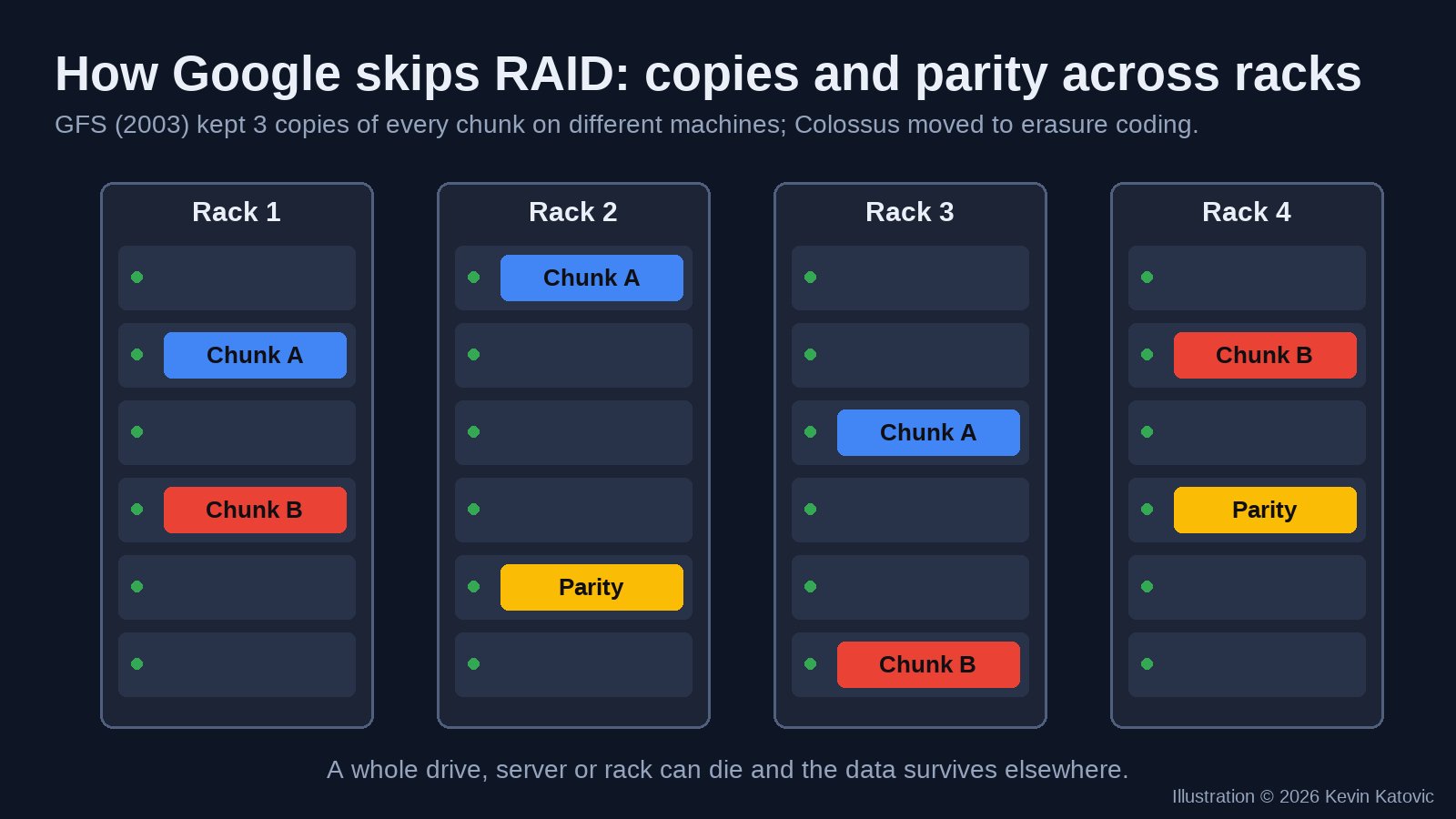
Here’s the funny part. The company with some of the biggest data centers on Earth was famous for not leaning on RAID cards at all. Google’s 2003 paper on the Google File System described cheap commodity drives, with every 64 MB chunk of data copied three times onto different machines. If a drive, a server or a whole rack died, the software made a fresh copy somewhere else. Google’s newer system, Colossus, uses erasure coding, which is the same parity idea as RAID 5 and 6 but spread across many servers instead of inside one box, so it needs less raw space than three full copies.
Some of the technology from years back is still around, in a museum anyway. Google’s early “corkboard” servers from 1999, bare motherboards and drives laid on cork, are in the collection of the Computer History Museum.
Google facilities that go back the furthest
Google doesn’t publish what hardware is inside each building, so nobody outside the company can tell you which rooms still run older gear. What we do know is which campuses have been running the longest: The Dalles, Oregon, which opened in 2006 as Google’s first company-built data center; Council Bluffs, Iowa; Pryor in Mayes County, Oklahoma; Berkeley County, South Carolina; Lenoir, North Carolina; and Douglas County, Georgia. Every one of them has been expanded and refitted many times since.
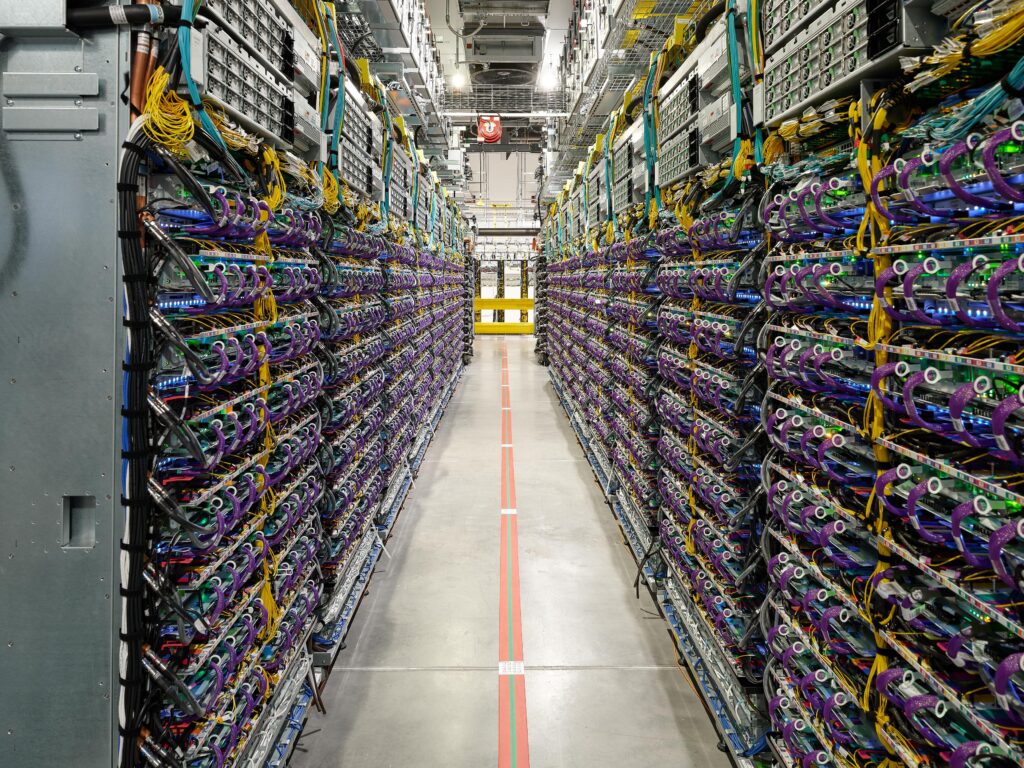
Want to see inside? Google publishes its own official photos in its data center gallery, and the full list is on its locations page. The pictures in this post are my own illustrations.
Power is the real cost
Drives are cheap. Electricity to spin thousands of them is not, which is why these campuses sit where power is cheap. If you’re curious, I keep an eye on what big users pay for power along the Columbia River, the Iowa rates behind the Council Bluffs build-out, Oklahoma’s industrial electricity numbers and how South Carolina prices a data center load. And if you’re planning your own room full of drives and GPUs, you can size the whole build, storage included, before you buy a single disk.
FAQ
What RAID level gives the maximum storage size?
RAID 0 and JBOD (spanning) both give you 100% of the raw capacity. Four 20 TB drives give 80 TB. Neither protects you: if one drive dies in RAID 0 you lose everything, and in JBOD you lose whatever was on that drive.
Can I mix different size hard drives in RAID?
You can, but classic RAID treats every drive as if it were the size of the smallest one, so the extra space is wasted. JBOD, Linux LVM, ZFS with matched pairs, or tools like mergerfs or Unraid use mixed sizes much better.
Does Google use RAID in its data centers?
Google has said its file systems protect data in software instead: the 2003 Google File System kept three copies of each chunk on different machines, and its newer Colossus system uses erasure coding, a cousin of RAID 5 and 6 parity spread across many servers.
Commands above erase the drives you name. Back up first. This is general information, not a guarantee for your hardware.